
Why aren’t customers receiving emails sent?
There may be a few different reasons why customers are not receiving emails that are being sent from our software:
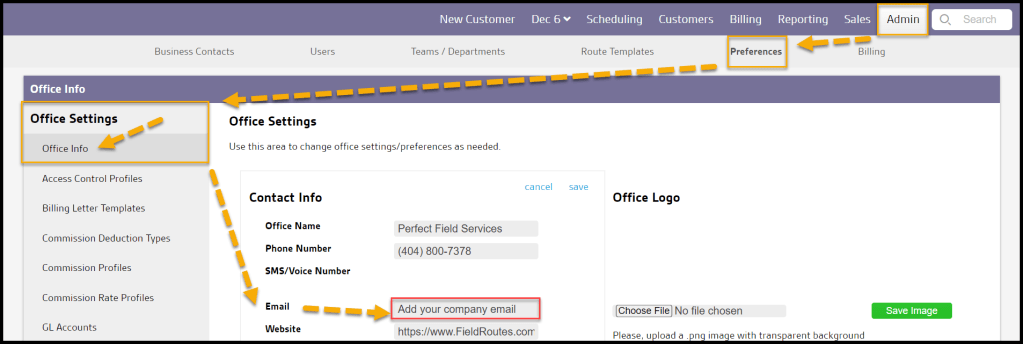
- Make sure a company email has been saved under Admin > Preferences > Office Settings > Contact Info. The email that is placed here will be the sender for any emails sent via our software.
- Have the customer look in their spam/junk folder. Depending on what email provider the customer is using, certain emails sent can end up in the spam/junk folder.
- If the company’s email is a Yahoo or AOL email address, we recommend changing it to Gmail. We use a third-party system to allow the company to send emails to customers with the company email as the sender, and unfortunately, Yahoo and AOL frequently prevent these emails from successfully being delivered to the receivers. As of the moment, the only way to resolve this issue is by using a Gmail address in our software.
 Moxie Pest Control Office Guide