
Unpaid Initial
Summary
The Unpaid Initial Report shows the customers who have not paid for their initial service within the date range selected.
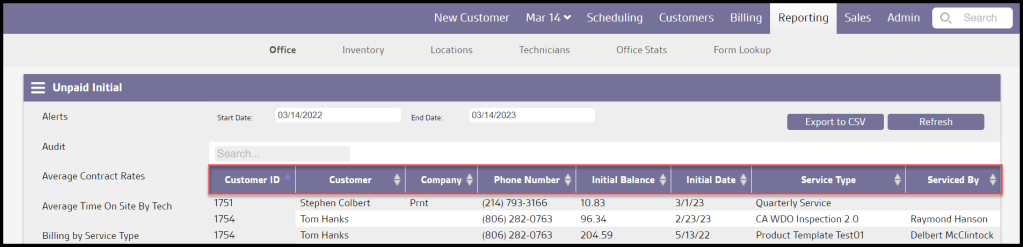
The report will automatically include columns for the customer ID, customer name, phone number, initial date, and initial balance. This helps in reaching these customers quickly.
Important Points:
- This report is designed to show all customers with an unpaid balance on their initial service.
- The initial service is always considered the first service of the subscription.
Accessing the Unpaid Initial Report
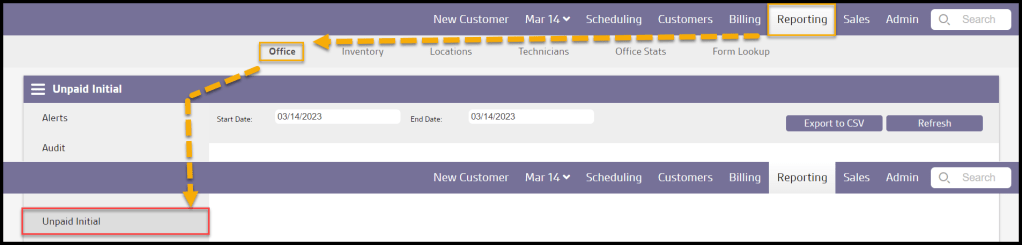
To access the Unpaid Initial Report, go to:
Reporting > Office Reporting > Unpaid Initial Report.
Filtering the Unpaid Initial Report
To filter the customers who have not paid for their initial service, toggle these filters.
- Start and End Dates: Limit results between specific dates in the Unpaid Initials.
Select Refresh to run the report.

Viewing the Unpaid Initial Report’s Data Columns
The Unpaid Initial report will include important information regarding the customer’s account.
- Customer ID: Displays the unique identification number for the customer’s account.
- Customer: Displays the first and last name of the customer.
- Company: The company name will appear in this column if this account is commercial property.
- Phone Number: View the phone number in the Info tab of the customer card.
- Initial Balance: Shows the remaining unpaid balance on their initial invoice.
- Initial Date: See the date the customer received their initial service.
- Service Type: View the service type for the customer’s scheduled service.
- Serviced By: Shows the name of the technician that serviced the appointment.
Select the up and down arrows to re-order the report.
Exporting an Unpaid Initial Report
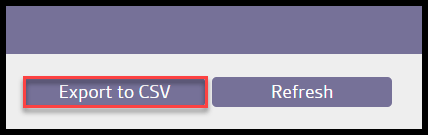
To export an Unpaid Initial Report as a CSV File, select Export to CSV.
 Moxie Pest Control Office Guide