
Understanding the Account Statement
Summary
The information presented to the end customer on the Customer Account Statement provides enhanced clarity and more effectively communicates services provided, dates of those services, payments received, and expected payment amounts. This guide provides a detailed explanation of what information is presented on the customer invoice so that companies using the platform can better respond to customer questions.
Important Points:
- While the upper Return and Mailing address positions are adjustable, the Remittance address is static and situated for the window of a typical #10 envelope.
The Account Statement Overview
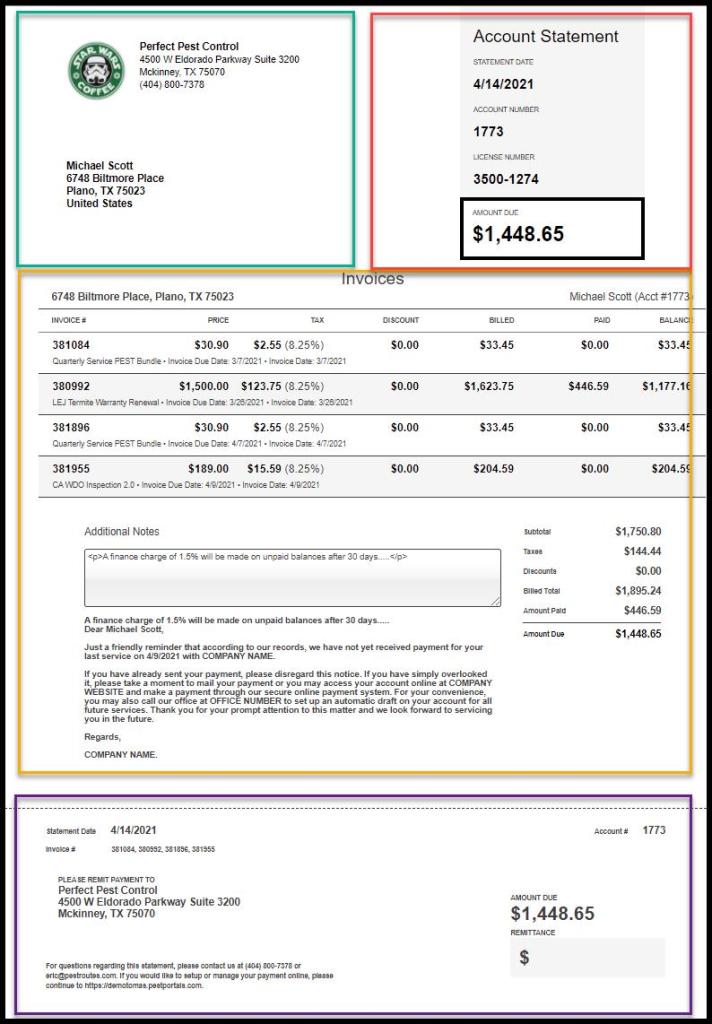
The Customer Account Statement is divided into four areas and laid out as shown below:
- Return and Mailing Addresses
- Primary Information Summary
- Invoice Detail Table and Totals
- Remittance Tear-off Sheet
Section 1: Adjusting Address Positions to Match Envelope Windows
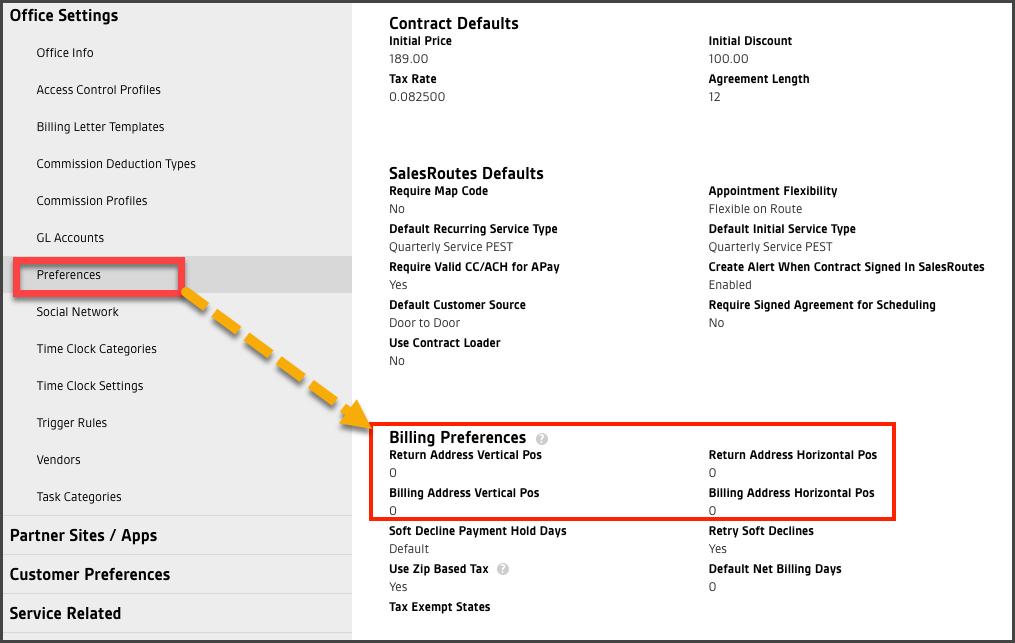
When mailing hard copies, address window placement can vary. Considering the numerous commercial envelope layouts, the mailing and return addresses can be adjusted independently to provide the best match for the address windows on a particular #10 envelope.

To adjust the positions, open:
Admin > Preferences > Office Preferences.
Under the Billing Preferences area, increase or decreases the values of the Return Address and Billing Address Vertical Pos and Horizontal Pos settings as needed. Save the settings once the respective addresses print in the correct position to view through the envelope windows.
Section 2: Primary Information Summary
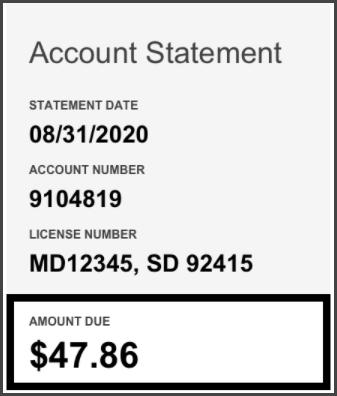
The most important information on an Account Statement document is provided in a summary box at the top of the invoice for easy reference.
- Document Type: Displays the type of document = Account Statement.
- Statement Date: Shows the date that the statement was generated.
- Account Number: Displays the customer’s account number.
- License Number: Shows the operating license number of the company.
- Amount Due: Displays the outstanding balance due.
Section 3: Data Table Layout of Itemized Info
Some Account Statements require significant itemized data involving several invoices, multiple services, and add-ons, and sometimes multi-unit properties. In these cases, a table containing the itemized data is included in the document. With a priority on text size and readability, the Web Content Accessibility Guidelines (WCAG) provided maximum details while maintaining legibility.
- Service Address (bold)
- Table Column Headers (logical and bold)
- Account Information (de-emphasized)
- Primary Information(larger and bold) This includes:
- Invoice Numbers
- Pricing
- Discounts
- Billed Amount
- Paid Amount
- Balance
- Secondary Information (smaller and de-emphasized) This includes:
- Service Type
- Payment Due Date
- Purchase Order Numbers
- Invoice Date
- Multi-unit references

Section 4: The Remittance Tear-off Section
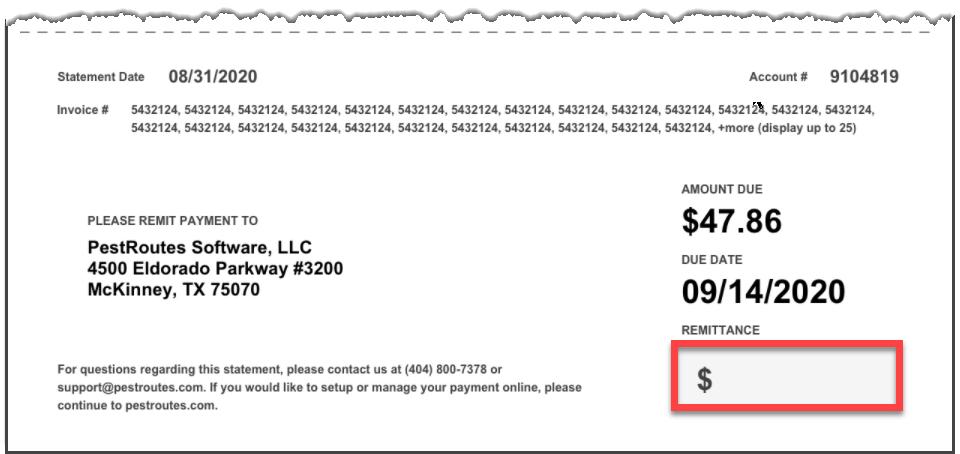
On the form, the lower portion of the Account Statement is separated by a dotted line representing a perforated Remittance tear-off section that could be removed and returned with a customer payment if a paper check is sent. As in the summary box at the top of the document, the perforation section shows only the most important information:
- Invoice Date
- Account #
- Invoice #
- Remittance Address
- Amount Due
- Due Date
- Remittance Space
If the customer uses the AutoPay feature, the Remittance field will display the word “AutoPay,” the Amount Due will show $0.00, and a message will be displayed regarding the planned AutoPay amount.
NOTE:
The bottom statement here on the Remittance Sheet is hard-coded and not user-configurable. It pulls the company’s contact information from Admin > Preferences > Office Info and adds the Customer Portal address based on their company database.
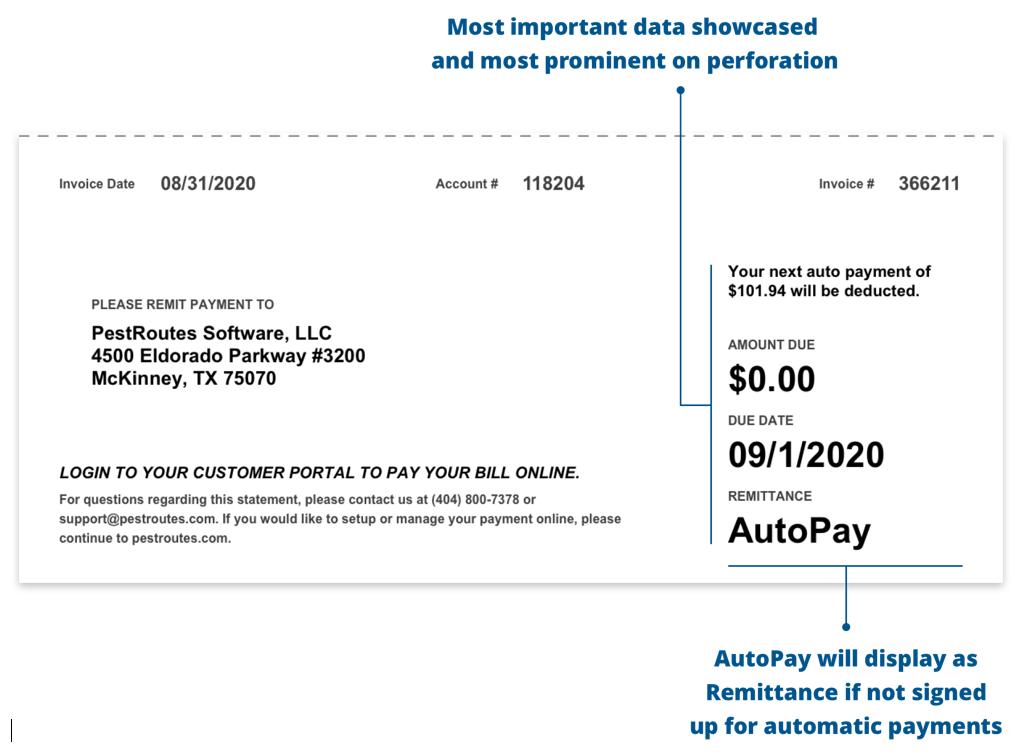
If AutoPay is not involved, the Remittance box will allow the customer to include the amount of the check payment being made.
 Moxie Pest Control Office Guide