
Top 10 Report
Summary
The Top 10 Report shows the top-performing sales reps in various categories.
Important Points:
- The top ten list requires a rep to have at least 10 sales in a period to be considered. This helps reps with 1 or 2 accounts from taking over the aPay and contract values stats.
- Customers need to be sold and have a completed service to be considered in this report.
Accessing the Top 10 Report
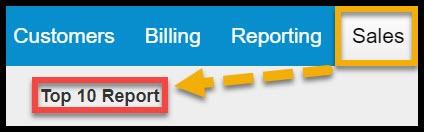
To access the Top 10 Report, go to:
Sales > Top 10 Report.
Filtering the Top 10 Report
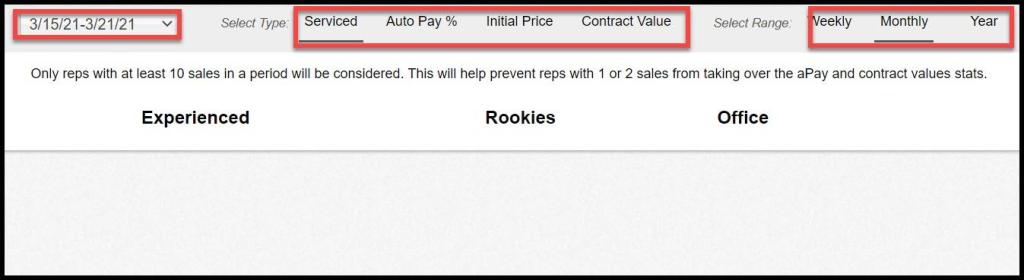
To filter the Top 10, toggle the filters.
- Date: Select the date range for customers sold between here. This report will only allow the user to select one week at a time.
- Select Type: Select the primary stat that will display for each sales user.
- Serviced: View how many customers were serviced,
- AutoPay %: Display the percentage of customers on AutoPay.
- Initial Price: See the average initial price.
- Contract Value: View the average contract value.
- Select Range
- Weekly: View total values for the week selected.
- Monthly: See the total values for the month the week selected is in.
- Year: Displays total values for the year.
Viewing the Top 10 Report’s Data Columns
The columns in the report are detailed below. Note that if no reps are showing up, it is likely because the top ten list requires a rep to have at least 10 sales in a period to be considered.
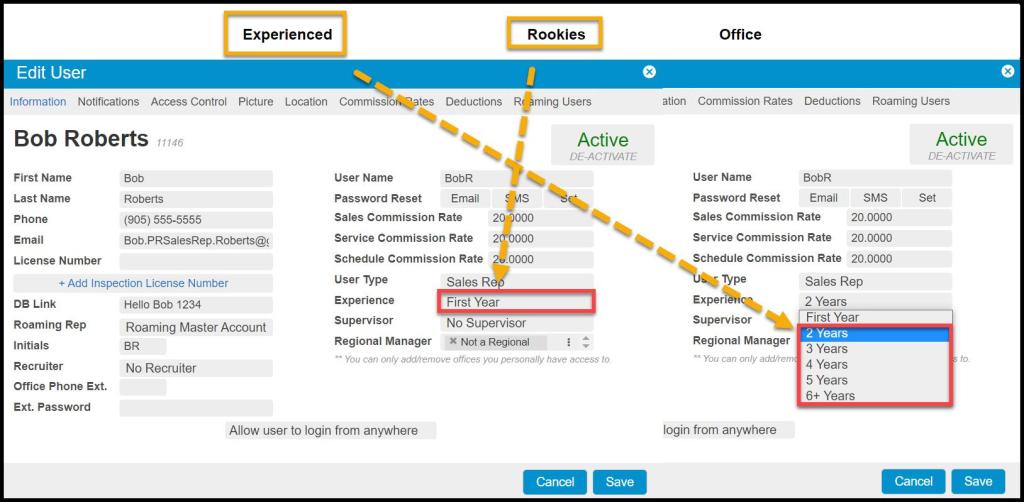
- Experienced: This field will display your experienced sales users based on the number of years of experience set in the User card. Experienced users have 2 years or more selected for the experience field under the User card.
- Rookies: This field will display the rookie sales users. Rookie users are sales users with First-Year experience selected under the User card.
- Office: This field will display a total value for the office.
 Moxie Pest Control Office Guide