
Technician Stats Report Technician Stats and Key Indicators
Summary
The Technician Stats Report is a tool that allows supervisors and managers to evaluate the performance of their field technicians based on various metrics reported by their daily routes and appointments processed in the system.
The Stats to Include field is an important part of the Technician Stats. Here is a breakdown of all the stats to include in the report.
The Key Indicator field is the primary statistic that will be displayed for each office on the Office Lead Board and for each technician on the Technician Roster, and also affects the order of the offices and technicians in the Technician Stats report.
Important Points:
- The user can toggle the report view between a table view with data columns or a baseball card
- view that highlights each member on a team’s roster.Choose a Key Indicator statistic as the primary metric for ranking the teams and techs.
A Productive Appointment is a regular appointment for which the invoice or production value is >$0.00.
Accessing the Technician Stats Report
The Key Indicator and the Stats to Include are two main filters in the Technician Stats Report. To access the Technician Stats Report, go to:
Reporting > Technicians.
NOTE:
For more information on the Technician Stats Report, please see the main guide on the Technician Stats Report.

What are Technician Statistics? (Stats to Include Field)
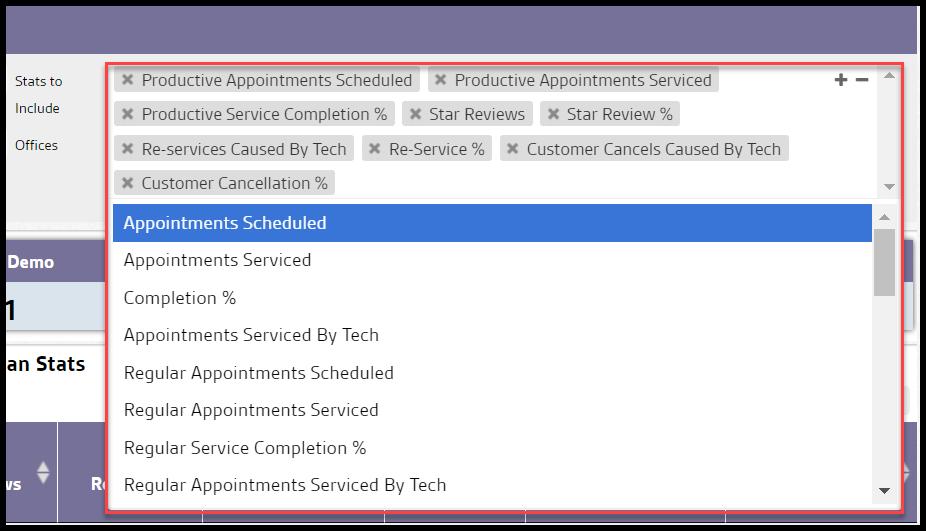
Here is a complete breakdown of all the technician stats in the Stats to Include field. To see more options, select the box, and a dropdown will appear with more selections. The user can type in the name of specific stats to locate them quickly. Remove stats from the list by selecting the “x” to the left side of the stat.
- Service Stats (Any service):
- Appointments Serviced: Show the number of appointments assigned to the technician that the technician completed.
- Appointments Serviced By Tech: Display the number of appointments assigned to and completed by the technician.
- Appointments Serviced Not Assigned: Show the number of appointments completed by the technician that was NOT assigned to the technician.
- Total Appointments Serviced By Tech: Show the total number of appointments completed by a technician regardless of whether they were or were not assigned to the technician.
- Appointments Scheduled: Show the number of appointments scheduled for the technician. This number includes pending and no-show appointments but excludes canceled and rescheduled appointments.
- Completion %: Display the completion rate, calculated by the Appointments Serviced, divided by the Appointments Scheduled, multiplied by 100.
- Re-service %: Display the re-service rate, Calculated by the Number of Re-services caused by the technician, divided by the Average Services Per Period, multiplied by 100.
- Regular Service Stats (Any stand-alone services that are not marked as re-service or any service attached to a subscription)
- Regular Appointments Serviced: The number of regular appointments assigned to the technician that was completed.
- Regular Appointments Serviced By Tech: The number of regular appointments both assigned to and completed by the technician.
- Regular Appointments Serviced Not Assigned To Tech: The number of regular appointments completed by the technician that was NOT assigned to the technician.
- Total Regular Appointments Serviced By Tech: The total number of regular appointments completed by a technician regardless of whether they were or were not assigned to the technician.
- Regular Appointments Scheduled: The number of regular appointments scheduled for the technician. This number includes pending and no-show appointments but excludes canceled and rescheduled appointments.
- Regular Service Completion %: The rate that the regular services were completed. It is calculated by the Regular Appointments, divided by the Serviced Regular Appointments Scheduled, multiplied by 100.
- Productive Service Stats (Any Regular Services where the service invoice subtotal or production value is greater than $0):
- Productive Appointments Serviced: The number of productive appointments assigned to the technician that they completed.
- Productive Appointments Serviced By Tech: The number of productive appointments both assigned to and completed by the technician.
- Productive Appointments Serviced Not Assigned To Tech: The number of productive appointments completed by the technician that was NOT assigned to the technician.
- Total Productive Appointments Serviced By Tech: The total number of productive appointments completed by technicians regardless of whether they were or were not assigned to the technician.
- Productive Appointments Scheduled: The number of productive appointments scheduled for the technician. This includes pending and no-show appointments but excludes canceled and rescheduled appointments.
- Productive Service Completion %: Calculated the number of Productive Appointments Serviced, divided by the Productive Appointments Scheduled, multiplied by 100.
- Non-Serviced Appointment Stats:
- No Show Appointments: The number of appointments assigned to the technician that was marked as a no-show.
- Canceled Appointments: The number of appointments assigned to the technician that was canceled.
- Pending Appointments: The number of appointments assigned to the technician that is still pending for service.
- Rescheduled Appointments: The number of appointments assigned to the technician that was rescheduled.
- Appointments Not Serviced: The number of appointments assigned to the technician that are either canceled, marked as no show, or still pending for service.
- Additional Appointment Stats
- Total Reported Time on Site: Total time spent servicing appointments based on the time in and time out recorded by the technician.
- Total Actual Time on Site: Total time spent servicing appointments based on the check-in and check-out times recorded by PestRoutes (cannot be modified by the technician).
- Payments Collected: The number of appointments completed in which the technician collected the payments.
- Total Amount Collected: The total amount of money collected by the technician.
- Auto Pay Appointments: The number of appointments that the technician completes in which the customer is signed up for AutoPay.
- Potential Payments Collected: The number of appointments serviced by the technician in which the service charge is greater than 0, and the customer is NOT on AutoPay.
- Star Reviews: The number of appointments serviced by the technician in which the customer left a star review.
- Star Review %: Calculated by the number of Star Reviews, divided by the Total Appointments Serviced by Tech, multiplied by 100.
- Subscription Cancels Caused by Tech: The number of canceled service subscriptions between the start and end date filters where the technician was the last one to service the subscription before cancellation.
- Subscription Cancellation %: Calculated by the Number of Subscription Cancels Caused by Tech, divided by the number of Average Services Per Period.
- Customer Cancels Caused by Tech: The number of canceled customer accounts between the start and end date filters where the technician was the last one to perform any service for the customer before cancellation.
- Customer Cancellation %: Calculated by the Number of Customer Cancels caused by Tech, divided by the number of Average Services Per Period.
What are Key Indicators?
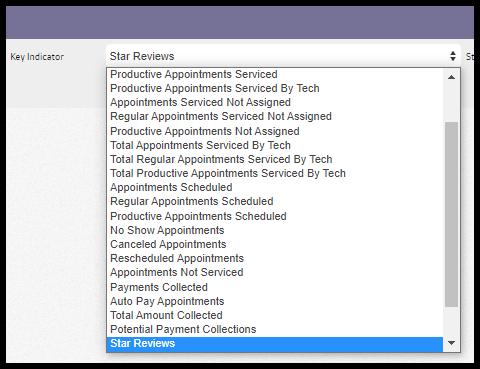
The Key Indicator is the statistic that will be displayed for each office on the Office Lead Board and for each technician on the Technician Roster. In addition, the report will order offices and technicians by the specified key statistic in descending order.
- Appointments Serviced: Total number of assigned appointments completed by the technician.
- Appointments Serviced By Tech: Total number of appointments assigned to and completed by the technician.
- Regular Appointments Serviced: The number of completed regular appointments assigned to the technician.
- Regular Appointments Serviced by Tech: The number of regular appointments both assigned to and completed by the technician.
- Productive Appointments Serviced: The number of productive appointments assigned to the technician that was completed.
- Productive Appointments Serviced by Tech: The number of productive appointments both assigned to and completed by the technician.
- Appointments Serviced Not Assigned: The number of appointments completed by the technician NOT assigned to the technician.
- Regular Appointments Serviced Not Assigned: The number of regular appointments completed by the technician NOT assigned to them.
- Productive Appointments Not Assigned: The number of productive appointments completed by the technician but NOT assigned to them.
- Total Appointments Serviced by Tech: The total number of appointments completed by a technician, whether or not they were assigned to them.
- Total Regular Appointments Serviced by Tech: The total number of regular appointments completed by a technician regardless of whether they were or were not assigned to the technician.
- Total Productive Appointments Serviced by Tech: The total number of productive appointments completed by the technician regardless of whether they were assigned to them.
- Appointments Scheduled: The number of appointments scheduled for the technician excluding Cancellations and Reschedules, but including No-shows and Pending appointments.
- Regular Appointments Scheduled: The number of regular appointments scheduled for the technician. This number includes Pending and No-show appointments but excludes Cancellations and Reschedules.
- Productive Appointments Scheduled: The number of Productive Appointments scheduled.
- No Show Appointments: The number of appointments assigned to the technician that was marked as a no-show.
- Canceled Appointments: The number of appointments assigned to the technician that was canceled.
- Rescheduled Appointments: The number of appointments assigned to the technician that was rescheduled.
- Appointments Not Serviced: The number of appointments assigned to the technician that are either canceled, marked as no show, or still pending for service.
- Payments Collected: The number of payments collected by the technician.
- AutoPay Appointments: The number of appointments that the technician completes in which the customer is signed up for AutoPay.
- Total Amount Collected: The total amount of money collected by the technician.
- Potential Payment Collections: The number of appointments serviced by the technician in which the service charge is greater than 0, and the customer is NOT on AutoPay.
- Star Reviews: The number of appointments serviced by the technician in which the customer left a star review.
- Re-services Caused by Tech: The number of re-service appointments where the tech was recorded as the reason for the re-service.
- Subscription Cancels Caused by Tech: The number of subscriptions that were canceled where the tech was recorded as the reason for the cancellation.
- Customer Cancels Caused by Tech: The number of customers that canceled where the tech was recorded as the reason for the cancellation.
 Moxie Pest Control Office Guide