
Target Issues by Service Type
Summary
The Target Issues by Service Type Report is a tool to view how many and what kind of issues have been treated for each service type within a certain date range.
In the mobile and desktop applications, you can select the targeted issues for products applied to customer appointments.
Important Points:
- The report pulls all targeted issues from mobile applications and in the system.
- Go to Admin > Preferences > Service Related > Service Types to create a chemical template in order to add default targeted issues for specific products.
- Target issues can also be applied to individual products in Admin > Preferences > Service Related > Products.
Accessing the Target Issues by Service Type Report
To access the Target Issues by Service Type report, go to:
Reporting > Office Reporting > Target Issues by Service Type.
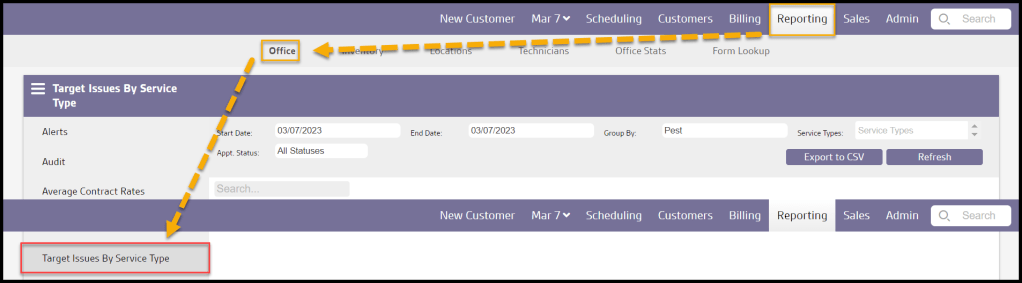
Filtering the Target Issues by Service Type Report
The Target Issues by Service Type report has easy-to-use filters to pull the required information.
- Start and End Date: Filter the issues targeted within a specific date range.
- Group by: Group issues by certain criteria.
- Pest: Group issues by the pest type.
- City: Group issues by the city that the appointment was in.
- Zip Code: Group issues by the zip code that the appointment was in.
- Appointment: Group issues by the appointment they were targeted for.
- Service Types: Filter for specific service types.
- Appt. Status: Specify what status of appointments the issue is recorded.
- All Statuses: Display all appointments regardless of appointment status.
- Completed: Display only appointments that have been completed.
- Pending: Display only appointments that have been marked as pending.
- Canceled: Display only appointments that have been canceled.
- Rescheduled: Display only appointments that have been rescheduled.
- No Show: Display only appointments where the customer was marked as a no show to the appointment.
Select Refresh when finished with the filters to load any changes.

Viewing the Target Issues by Service Type Report’s Data Columns
A number of data columns are present in the Target Issues by Service Type Report.
- Description: Depending on the option selected in the Group by Filter.
- Pest: Display issues by pest type.
- City: Display the city of the appointment was in with the target pests.
- Zip Code: Display the zip code that the appointment was in.
- Appointment: Display the date of the appointment was in with the target pests.
- Count: Displays the number of the pest/issue per unit of measurement.
- Issues: Displays the name of the pest or issue reported for the appointment.
Select the up and

Exporting the Target Issues by Service Type Report
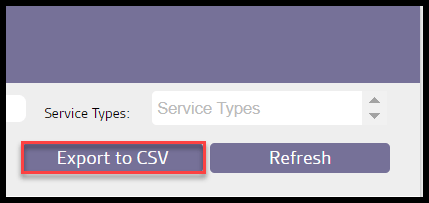
To export the Target Issues by Service Type Report to a CSV file, select Export to CSV.
 Moxie Pest Control Office Guide