
Renewal Subscriptions
Summary
Our software provides a Renewal Date option for subscriptions that require customers to renew such as termite warranties. Companies can provide various payment options and have flexibility in what triggers the beginning of a warranty and subsequent renewal dates. Our platform supports these configurations and includes an Expiration Date for those contracts and warranties with an end date.
NOTE:
If the software is already using the Expiration Date and not using the Renewal Date, then the Expiration Date functionality will continue to work similarly to a renewal date. Without a Renewal Date enabled for the Service Type, the Expiration Date will advance at the point of Renewal as well as auto-freeze a customer’s Subscription if a renewal is not paid by the Expiration Date.
Important Points:
- For Service Types and Subscriptions that use only an Expiration Date (and no Renewal Date), the Expiration Date will work similarly to a Renewal Date because it advances at payment of the Renewal, but the Expiration Date, when used alone, will not use the additional settings described in this guide. For customers to renew on the portal, the user must set the Billing Frequency on the Subscription to Renewal. Using any other frequency will allow the customer to prepay for service, but it will not advance the renewal date.
Setting up Renewal Dates in Service Types
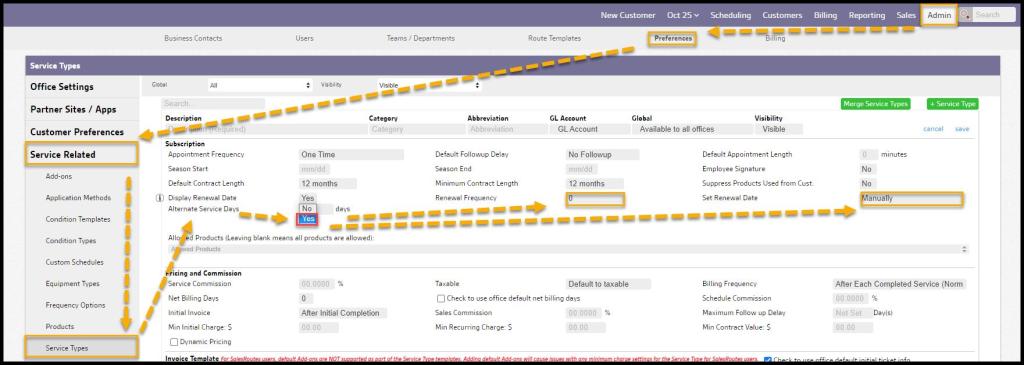
The Renewal Date is set up at the Service Type level. Go to Admin > Preferences > Service Related > Service Type. Check the box for Display Renewal Date. To see the other available settings for the Renewal Date, press Save.
NOTE:
Once the Renewal Date is in use for any Subscription, and then the Renewal Date is disabled at the Service Type level, a warning is prompted to the user that there are subscriptions in use with this Renewal Date option. Disabling cannot be undone. Once disabled, the Expiration Date (if used) will serve as the Renewal Date, which could cause unintended behavior for the customers’ subscriptions.
Applying the Renewal Date in Subscriptions
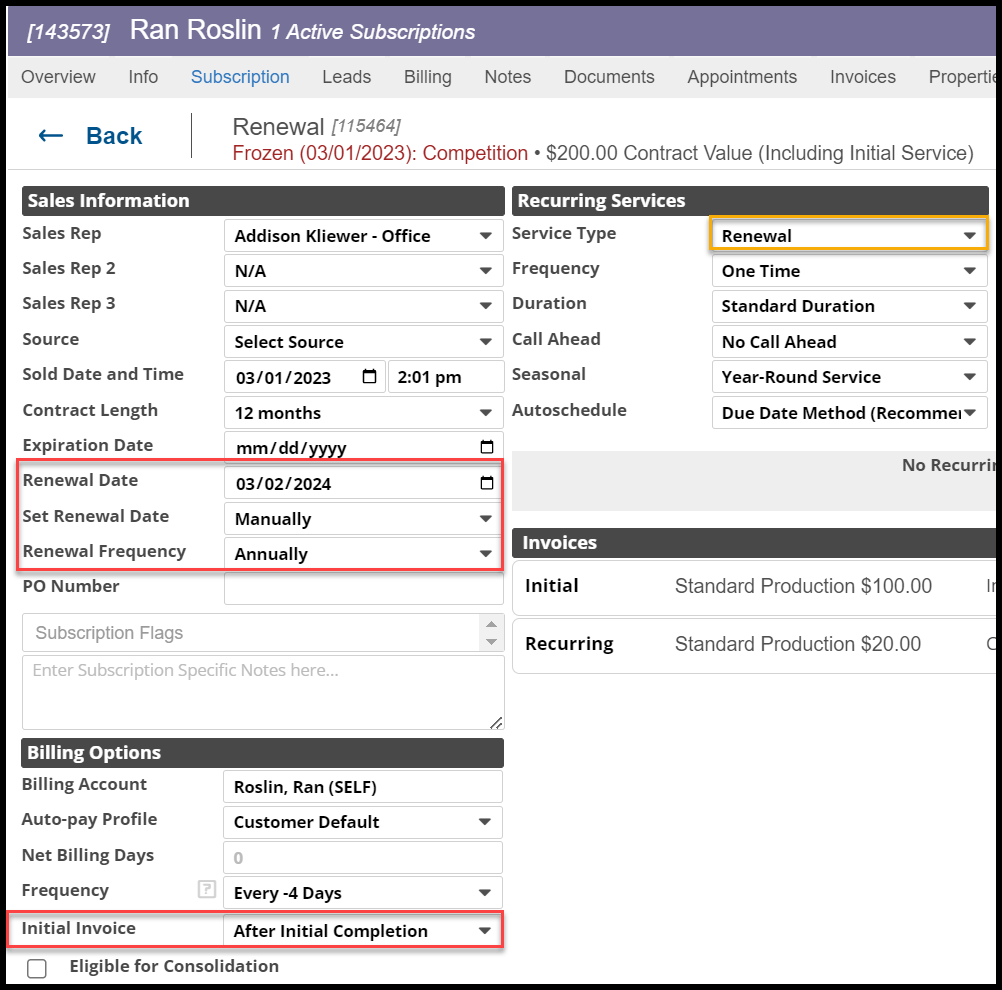
When creating a Subscription, the setting defaults for the Renewal Date from the Service Type will automatically populate. The user can override these settings at the Subscription level.
Applying the Renewal Date in the Customer Card
Set Renewal Date is the Subscription default for how the Renewal Date will be set. The options are:
- Manually – By default, the Service Type will be set to Manually. This is recommended for those that may not know when the warranty date will start, such as those doing commercial work where the warranty starts when a certificate of occupancy is issued which cannot be auto-set.
- At Initial Service Completion – Once the initial service is completed, the warranty start date will be set regardless of payment status. The Renewal Date will be set using the frequency setting.
- At Initial Invoice Payment – If At Initial Invoice Payment is selected, then a full payment must be received for the Renewal Date to be set. This setting can be overridden at the Subscription level.
NOTE:
If the Subscription is for Sentricon, do not use Payment Date as the Renewal Date. This configuration will conflict with the required Sentricon Anniversary Date (“SAD“), which must be the equipment installation date. For Sentricon, use At Initial Service Completion.
Renewal Frequency is the Subscription default for the frequency at which the Renewal will occur. The options are Annually (default), Semi-Annually, and Two Years. This setting can be overridden at the Subscription level if needed. Also, the user can make additional Renewal frequencies in Admin > Preferences > Service Related > Frequency Options.
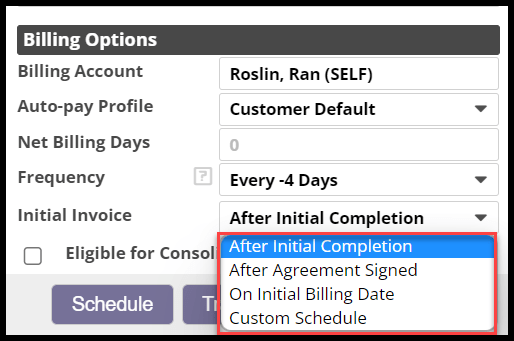
Using the Initial Invoice Options
Customers can also define when the initial invoice will be generated.
- After Initial Completion – Once the Subscription’s initial service appointment is completed, an invoice will generate for the amount set in the Initial Invoice Template.
- After Agreement Signed – Once the customer signs the agreement for the Subscription, the software will generate an invoice for the amount set in the Initial Invoice Template
- On Initial Billing Date – When this option is selected, a new field for “Initial Billing Date” will appear to select the date manually. The software will generate an invoice for the amount set in the Initial Invoice Template.
- Custom Schedule – The software will generate an invoice for the amount set in the Initial Invoice Template on the scheduled dates within the Custom Schedule. Custom Schedule is recommended for companies that want to bill monthly in arrears for the initial amount.
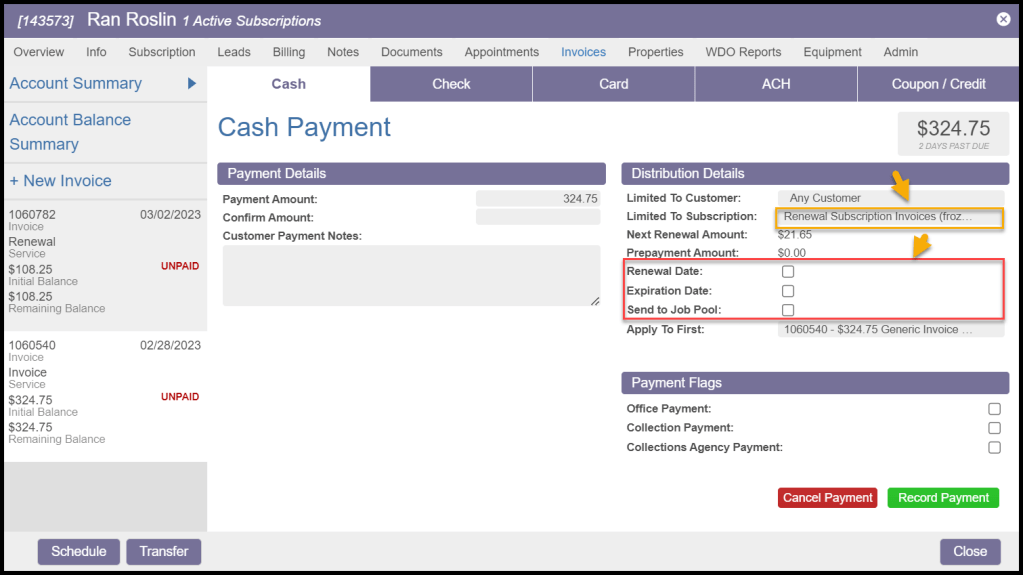
Payments
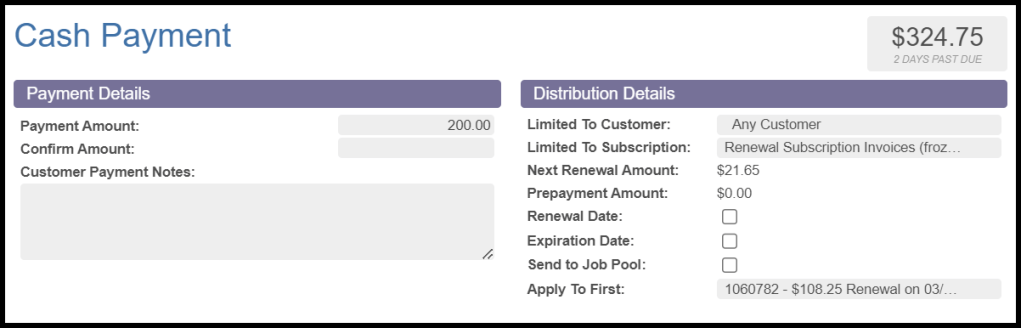
When payments are received for renewals and processed within the Invoices tab of the Customer Card, information about the Renewal and available options are presented.
- Renewal Date – the Renewal Date will automatically advance by the frequency set for the Renewal when full payment is received during the renewal period.
- For example, if the Renewal Date is 1/1/2021 and payment is received on 12/1/2020, then the new Renewal Date will advance to 1/1/2022 (and not a year from when payment was received). If the customer pays after the Renewal Date, the Subscription will not automatically freeze, and the Renewal Date will advance to 1/1/2022.
- Expiration Date – Expiration Date will only advance by one year if the Renewal Date is not enabled for the Service Type. A user can manually advance the Expiration Date at any time.
- Send to Job Pool – When checked the customer’s subscription appointment will be sent to the Job Pool.
Partial Payments
- Initial payment: If a partial payment is received for the initial invoice and “Limited To Subscription” for the Renewal and the Renewal Date is set at the Initial Payment Date, the options will default to unchecked. The warranty start date will not be set until full payment is received. A message indicates that the payment is for less than the full initial amount.
- Renewal payment: If a partial payment is received for the Renewal and “Limited To Subscription,” then the options will default to unchecked. A message indicates that the payment is for less than the full renewal amount. It is assumed that a partial payment means that the customer has not met the requirement for the Renewal until full payment is received. The Renewal Date will not advance automatically, although the user can advance the date manually.
NOTE:
Partial payments are not allowed in the Customer Portal. Customers who pay/renew through the portal must pay in full.
Customer Portal
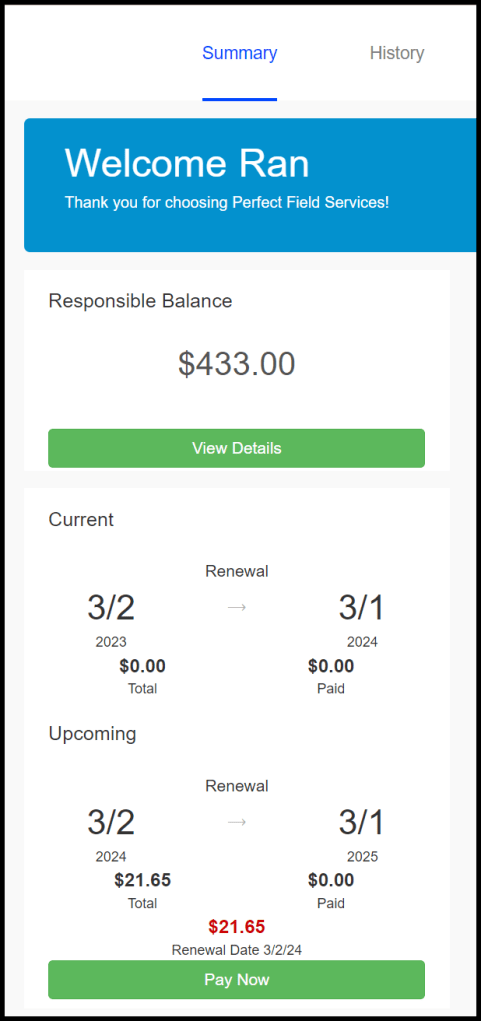
When using the Renewal Date for the Subscription, the Customer Portal will show the “Current” period’s effective dates with the associated amount for the Subscription and the paid amount. If the customer is paying for the Renewal in arrears, then the “Current” will reflect the amount paid to date for the current period.
The Customer Portal will also show the “Upcoming” if an Expiration Date is not at the same time as the renewal date. The Expiration Date would indicate the end of the contract, and the customer is not provided with an opportunity to renew or pay. If the upcoming period does not expire, then the customer will see a “Pay Now” button to pay and renew the Subscription.
Once the customer has paid for the Renewal, the payment may show as a prepayment until the invoice is generated on the Renewal Date.
If on auto-pay for quarterly, monthly, or another custom schedule for the Subscription where the customer is paying in advance of the Renewal, then the amount paid will reflect payments received to date for the Renewal.
For the renewal date to advance after the customer pays on the portal, please set the Billing Frequency on the subscription Renewal. Using any other frequency will allow the customer to prepay for service, but it will not advance the renewal date.
 Moxie Pest Control Office Guide