
Note Types
Summary
Add and manage custom Note Types from Preferences to organize the notes created in the office.
Having the ability to add custom Note Types is beneficial because specific Note Types can be created based on office needs.
Important Points:
- Changing a Note Type here will retroactively update all previous Note Types.
- A Note Type can be assigned when creating a note in the Customer Card. That Note Type will be organized under its broader Note Category. Please see the guide on Note Categories for more information.
- System reserved Note Types cannot be changed or altered.
- The Notes report can be used to pull reports based on Note Type.
Accessing the Note Types in Preferences
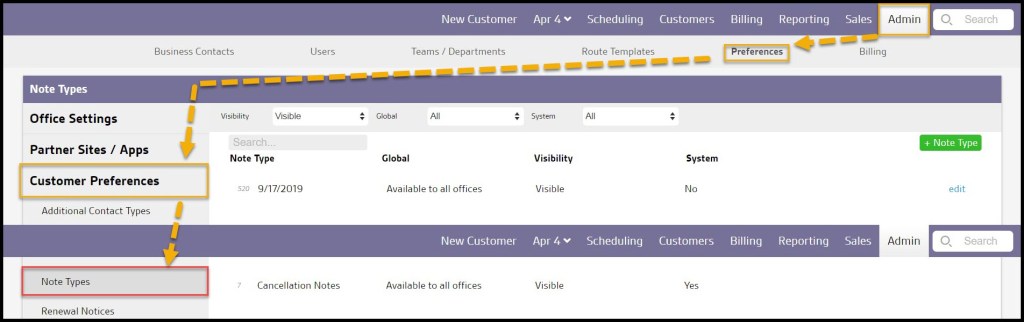
To access Note Types, go to:
Admin > Preferences > Customer Preferences > Note Types.
Filtering the Note Type
To filter the Note Types, toggle these filters.
- Visibility
- All: Show all Note Types.
- Visible: Show only visible Note Types.
- Hidden: Show only hidden Note Types.
- Global
- All: Display all Note Types.
- Specific to Office: Display only Note Types that are flagged to be specific to the user’s office.
- Available to all offices: Display only Note Types that are flagged as available to all offices.
- System
- All: Display All Note Types.
- Yes: Display only Note Types that are system Note Types.
- No: Display only Note Types that are not system Note Types.
The Preferences will automatically be refreshed when finished.

Adding or Editing a Note Type
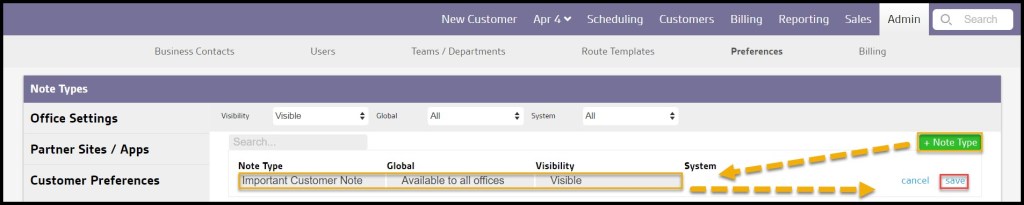
To add a new Note Type, select + Note Type, or edit to make changes to an existing Note Type.
- Note Type: Choose the name of the Note Type.
- Global: Flag the Note Type to show up for all offices or only specific to the user’s office(s).
- Visibility: Note Types can not be deleted, but they can be hidden by changing the Note Type visibility to hidden.
- System: Although the user can add and edit the custom Note Types, the system reserved note types that cannot be changed or altered. These will have the System field set to Yes.
Select Save when finished editing Note Types.
Where Does the Note Type Show Up?
Note Types are a filter in the Notes Report and a sub-category in Note Types.
 Moxie Pest Control Office Guide