
Frozen Customers With Payment Accounts
Summary
The Frozen Customers With Payment Accounts Report shows all of the user’s frozen customers that still have a payment method on file. This report could be beneficial if the user is attempting to charge frozen accounts for past balances.
Important Points:
- This report only shows frozen customers with a payment method on file on the desktop application.
- Export this report by selecting “Export to CSV”.
- Utilize the search bar to find specific customers.
Accessing the Frozen Customers with Payment Accounts Report
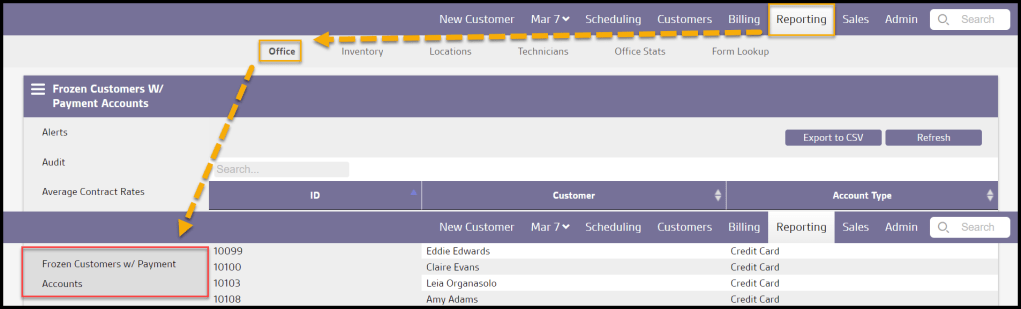
To access Frozen Customers with Payment Accounts Report, go to:
Reporting > Office Reporting > Frozen Customers with Payment Accounts.
Viewing the new Frozen Customers with Payment Accounts Report’s Data Columns
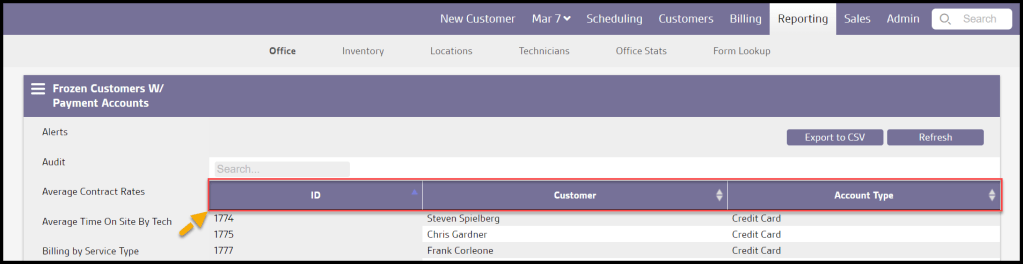
The Frozen Customers with Payment Account Report can display several data columns.
- ID: Displays the customer’s unique identification number.
- Customer: Shows the frozen customer’s first and last name.
- Account Type: View the account type for the frozen customer.
Exporting a Frozen Customers with Payment Account Report
To export a Frozen Customers with Payment Account Report as a CSV File, select Export to CSV.

 Moxie Pest Control Office Guide