
Flexible on Route vs Fixed to Spot
Summary
The user can determine how flexible a customer’s appointment is by choosing Fixed to Spot or Flexible on Route. This guide will explain the difference between these two options.
Important Points:
- “Fixed to Spot” ignores the time window and puts appointments exactly where the user originally clicked when scheduling the appointment or where the user specifically drags them to.
- “Flexible on Route” allows the software to move appointments around based on their time windows. Ideal for routes that sales reps are scheduling in the field
- Dragging an appointment into the colored route header automatically makes the appointment “Flexible on Route.”
- Dragging an appointment into a specific spot automatically makes the appointment “Fixed to Spot.”
Time Windows versus Planned Arrival Time
When scheduling, there are several time constraints to consider. These include the arrival time and the service time.
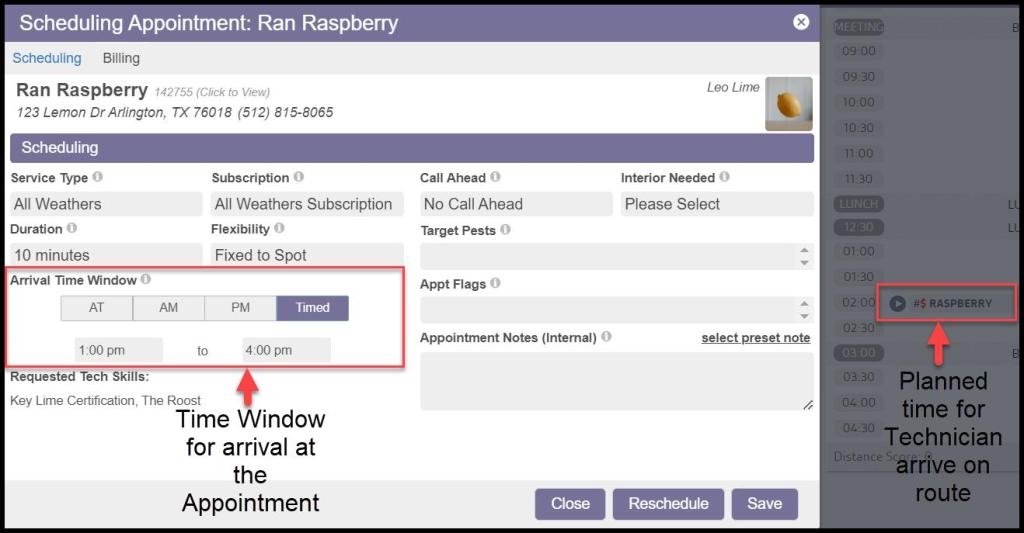
- The arrival time window in the Appointment Card. This is the time window that the customer will see on their appointment reminder.
- The time the user plans on having the technician service the appointment. This is the time slot the user would place the appointment on the route.
For example, a customer’s time window may be set to be between 3-5 PM. This means that the technician will arrive to service the property anytime between 3-5 PM.
But, depending on how the user has the route planned out, it may be best to have the technician arrive around 4:30 PM. The customer might be in a high-traffic area, for example.
In this case, the user would set the time window in the appointment card from 3-5 PM, but the user would place the actual appointment on the 4:30 PM slot on the route.
Flexible on Route versus Fixed to Spot
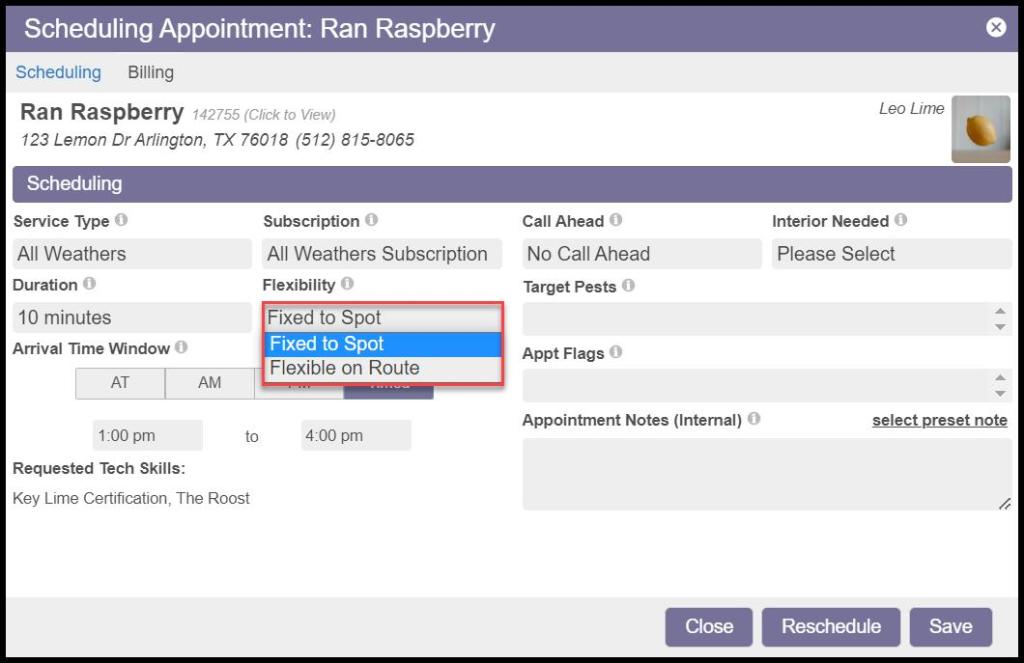
To manage these constraints effectively, there are two settings for appointments inside of the appointment card.
- Fixed to Spot: A fixed-to-spot appointment will ensure the appointment does not move spots on the route because of another appointment. An “S” will be shown on the route to indicate that the appointment is “Fixed to Spot.”
- Flexible on Route: This option makes the appointment flexible to move on the route. If another appointment is scheduled in its spot, the appointment will move to a different spot. An “R” will be displayed next to the appointment on the route to indicate that the appointment is “Flexible on Route”.
Flexible on Route
Marking an appointment as Flexible on Route will cause the software to automatically rearrange appointments based strictly on their time windows (not considering optimal driving distance).
For example, if a user has one AT (Anytime) appointment in the 8:00 spot and schedules another timed appointment between 8:00-9:00, the desktop software will automatically shift the AT appointment into a new spot to make room for the 8:00-9:00 appointment.
This is especially useful when sales reps are scheduling on the route with the mobile apps. The desktop application will automatically manage the time windows without letting sales reps mess up the route order.
It ensures that appointments are never overbooked and every possible time slot is available for the sales reps. It can also be convenient in the office so that appointments automatically move as timed appointments are added.

Fixed To Spot
Marking an appointment as “Fixed to Spot,” then it will stay in the spot that it was put in, no matter what the time window says.
This allows users to put appointments in their preferred order without worrying about the software automatically moving them around. It also allows users to determine when appointments should be “overbooked” and when to put appointments outside their time window when necessary. This is typically how office staff schedule appointments because it is very easy to re-arrange appointments.

Optimizing the Route
Everything discussed here is focused on managing time windows, and does not consider route optimization.
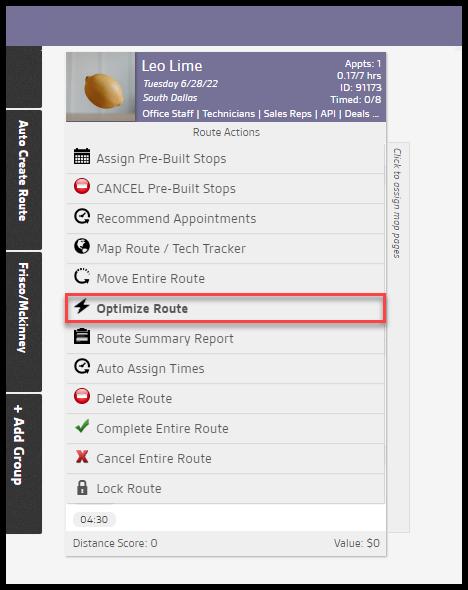
Optimizing the route before each technician leaves for the day is highly recommended, as it will automatically arrange the appointments in the best order while respecting time windows.
This will make all appointments fixed to a specific spot so that they are kept in the optimal sequence for that day. This ensures that the technicians have the best possible route and use the least gas and time on the route.
 Moxie Pest Control Office Guide