
Disbursements Report
Summary
The Disbursements Report provides FieldRoutes Payments customers clarity on CC/ACH funds deposited by the payment system into their account. Since these transactions typically take several days to clear and be deposited, and these deposits often represent multiple transactions aggregated together, the report shows the total Sales on these transactions minus the fees associated with processing those payments resulting in the net disbursement/deposit.
This report clarifies discrepancies between gross revenue reports and actual net deposits to facilitate the reconciliation of accounting records with bank statements.
Important Points
- The Disbursement Report is exclusively available to customers using the FieldRoutes Payments service.
- Customers may call (888) 496-8293 for further details about using FieldRoutes Payments.
- Offices with multiple merchants will see each of the merchant accounts in the report.
- Offices that share a merchant account will see the disbursements for all of the offices.
Open the Disbursements Report
To review the Disbursements Report navigate to:
Billing > Disbursements

NOTE:
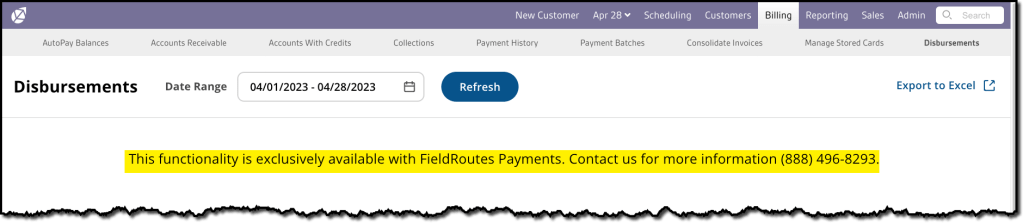
If a customer is not yet using FieldRoutes Payments, the following notification will appear, along with a contact number to call to begin using the service if desired.
Understanding the Disbursements Report
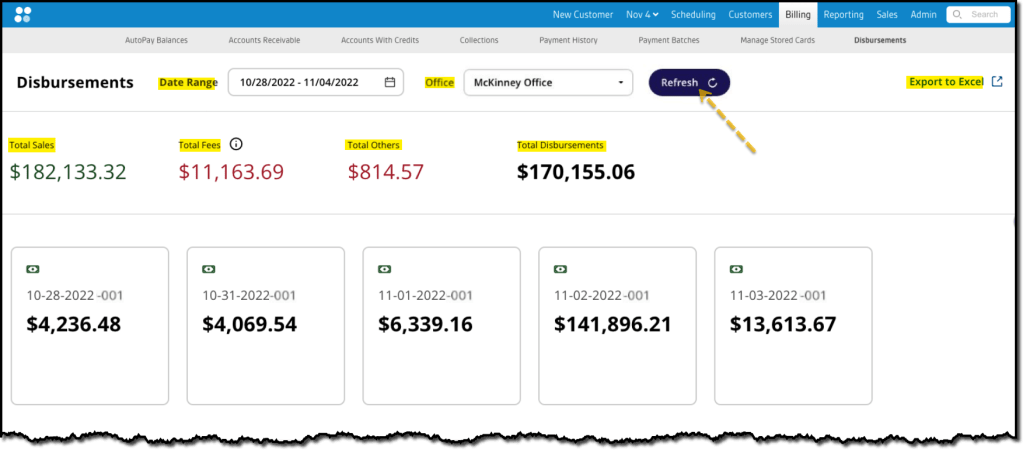
Once opened, the report is broken into three sections:
1. Report Filters & Actions
- Date Range: Specify the date(s) of the desired disbursements to review
- Office: Select the name of the office (if multiple are available) to review
- Refresh button: Selecting this button updates the report results per the Filter settings.
- Export to CSV: Use this feature to download the desired report results for offline review and analysis.
2. Dollar Totals for the Selected Date Range
- Total Sales: Gross card and ACH revenue for theDate Range.
- Total Fees: Transaction processing fees for the selected Date Range.
- Total Others: Additional charges associated with using the Auto Updater feature, underwriting, and processing fees, if any.
- Total Disbursements: The net funds deposited to the customer’s bank account during the selected Date Range.
3. Individual Disbursements
In this area, each tile represents a single disbursement made to the customer’s account. Each should coincide with deposit amounts on the bank statement of the target account, simplifying account reconciliation. Each tile contains:
- Date/Increment: The date the disbursement was sent to the account, plus an increment code:
- NOTE: Since multiple disbursements on a single day are possible, there is also an increment counter added to the end of the date. The first disbursement of each day will end in -001, such as 2022-12-19-001 to indicate it is the first disbursement on December 19, 2022. Subsequent disbursements on that day will increase to -002, -003, etc.
- Daily Net Disbursement: The dollar total of the disbursement, corresponding to a bank deposit amount.
Disbursement Grouping for Multiple Merchant Accounts (optional)
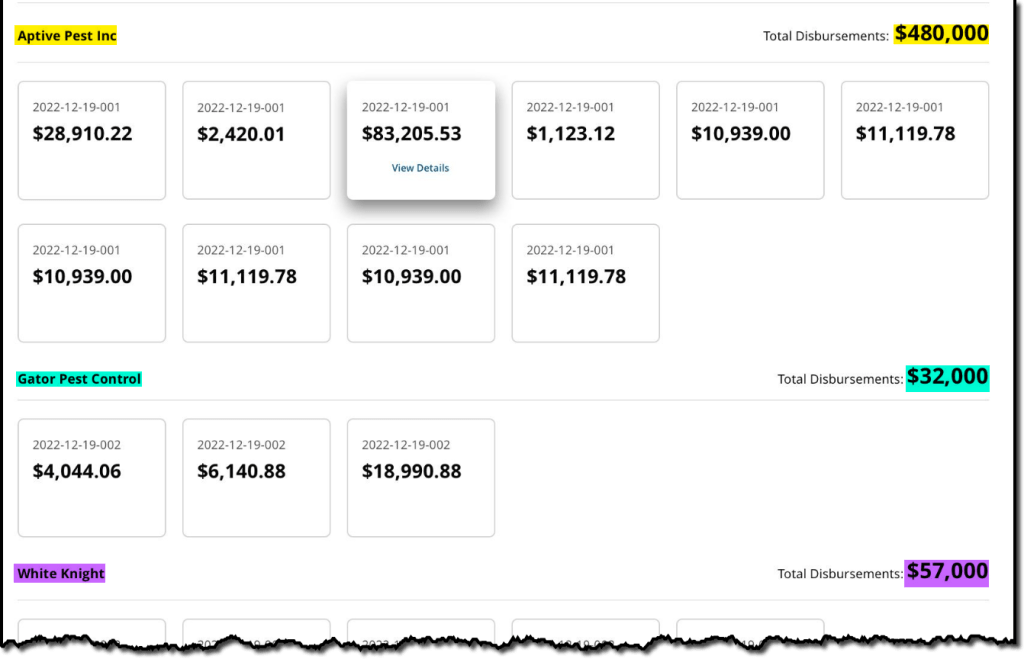
If multiple merchants are included in the same account, then the tiles will be grouped together by merchant (see below) with each group showing its own Total Disbursements. All the group Total Disbursement amounts should add up to the Total Disbursements in the top-level summaries.
Viewing the Disbursement Details
As stated above, each tile in the report displays the net deposit for card and ACH payments for a particular disbursement to facilitate bank statement reconciliation.
However, if specific details of the transactions involved in a particular disbursement are desired, there are easily accessed. Hovering the cursor over any disbursement tile will reveal and View Details link. Clicking on the tile will then open a Detailed View of all Sales Transactions and Fees involved. The following data is available on each transaction.
Detailed View
- Date: The Date/Time stamp when the transaction was initiated
- Type: Either Card or ACH transaction type
- Customer: The Customer from whom the funds were received
- Transaction ID: Specific ID code that for tracking the transaction
- Amount: The gross Sales amount for the transaction
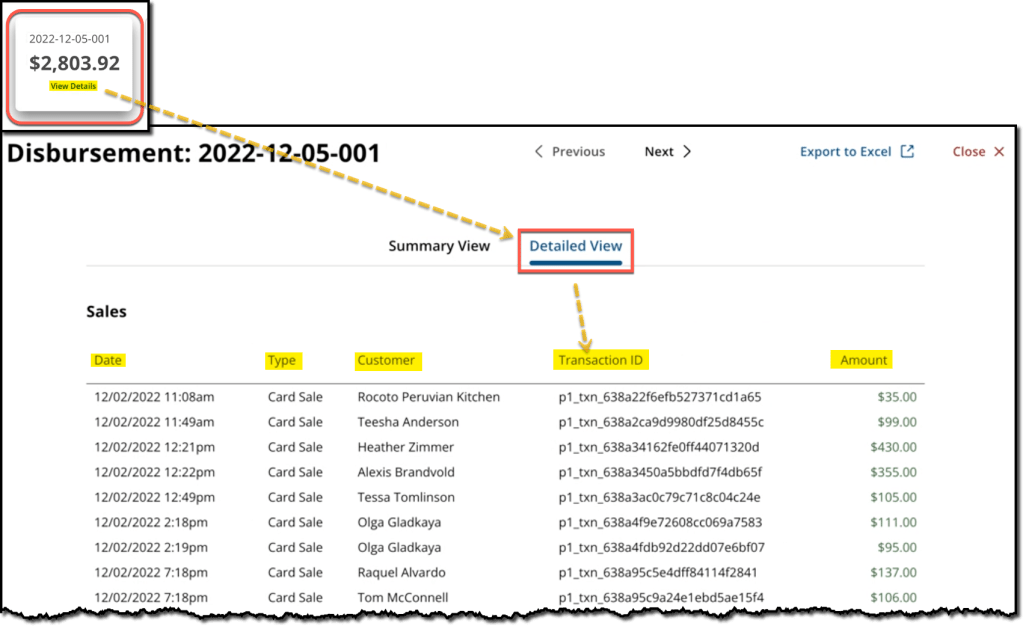
Additional details on all the Transaction Fees and Other Fees that were deducted for all the transactions in the disbursement will also be listed below the Sales transactions. The net Disbursement Total is listed at the bottom.
Summary View
From the Detailed View, select the Summary View for a simple breakdown of the totals.
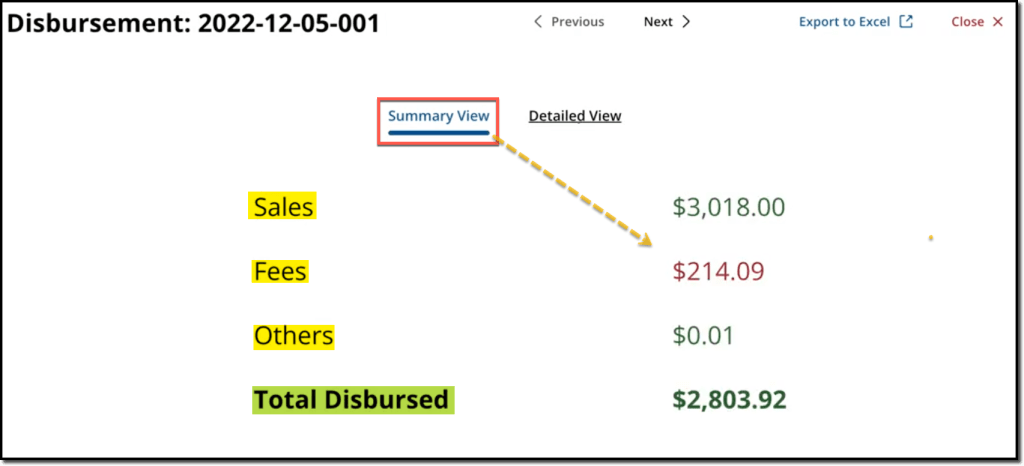
- Sales: The gross total of all card and ACH payments transactions in the disbursement
- Fees: The standard Transaction Fees debited during transaction processing
- Others: Additional fees/deductions occurring on that day, such as refunds on disputed payments, Account Updater usage fees, etc.
- Total Disbursed: The net amount deposited to the merchant’s bank account (Sales – Fees – Other Charges = Total Disbursed).
 Moxie Pest Control Office Guide