
Cancellation Reinstatement Report
Summary
The Cancellation Reinstatement Report displays customer subscriptions that were previously canceled and are now reactivated.
Important Points:
- The blue slider bar adjusts the time range between cancellation and reinstatement.
- The bar only goes up to 365 days.
- This report can be exported to CSV.
Accessing the Cancellation Reinstatement Report
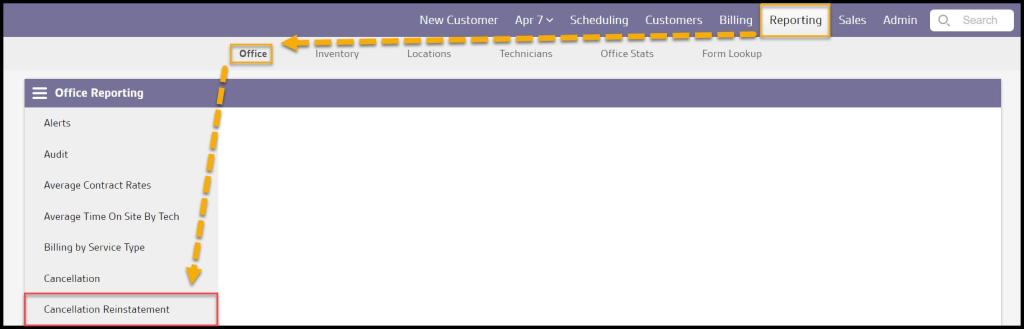
To access the Cancellation Reinstatement report, go to:
Reporting tab > Office Reporting > Cancellation Reinstatement.
Viewing the Cancellation Reinstatement Report Data Columns
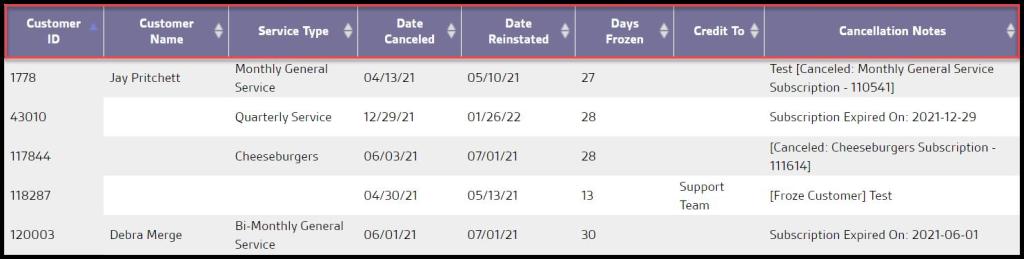
If there are entries that meet the filter criteria, this report will show the following data columns detailing information about the customer’s account.
- Customer ID: View the customer’s account unique identification number.
- Customer Name: View the customer’s first and last name on the account.
- Service Type: View the service type that was canceled and reinstated.
- Date canceled: View the date the subscription was canceled.
- Date Reinstated: View the date the subscription was reinstated.
- Days Frozen: View the number of days in between the cancellation date and the reinstatement date.
- Credit To: View the name of the sales representative that sold the subscription.
- Cancellation Notes: View the notes created when the customer canceled.
Exporting the Cancellation Reinstatement Report
Export the Cancellation Reinstatement Report to a CSV file by selecting Export to CSV.

 Moxie Pest Control Office Guide