
Average Contract Rates
Summary
The Average Contract Rates report will give the user great insight into how much revenue the average customer is bringing the company, based on service type.
It is beneficial to view the average revenue to make determinations of the company’s profits. This report can be helpful for decisions such as raising or lowering the average cost of your service types or finding out if sales representatives are discounting too much.
There are several ways the software will calculate the contract value for an agreement, please see the section on how the contract value is calculated below for more details.
Important Points:
- This report can only be filtered by date; all the information presented is based on customers sold within the selected date range.
- When a customer is on any recurring billing frequency, the contract value does not take the frequency of the service type into consideration, only the billing frequency.
- This report only includes active subscriptions.
Accessing the Average Contract Rates Report
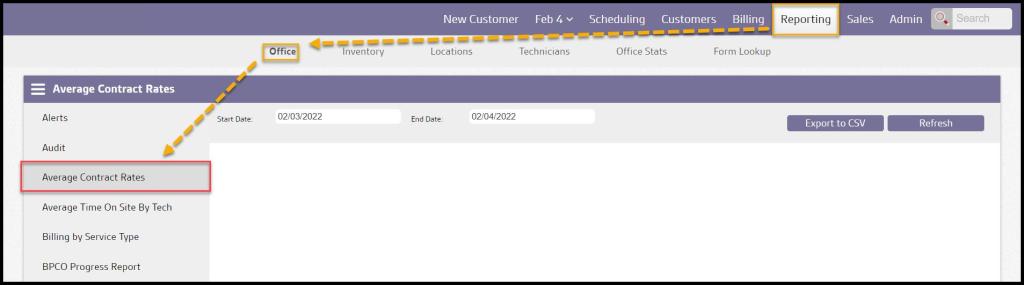
To access the Average Contract Rates Report, go to:
Reporting > Office > Average Contract Rates Report.
Filtering the Average Contract Rates Report
To filter the Average Contract Rates Report, toggle these filters.
- Start and End Dates: Limit results between specific dates in the Average Contract Rates Report. It is based on the customer’s initial sold-by date.
Select Refresh to run the report.

Viewing the Average Contract Rates Report’s Data Columns
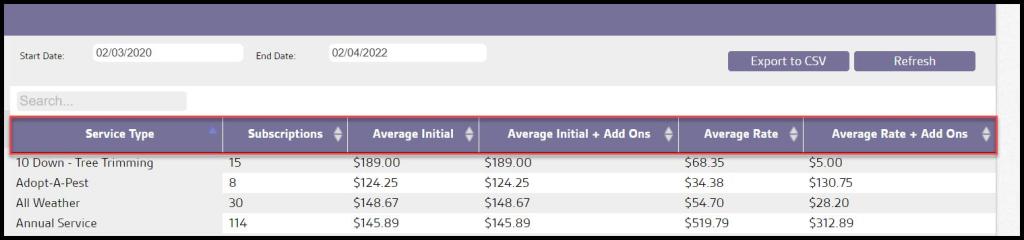
The Average Contract Rates report calculates the average value of the initials and recurring charges for each of the user’s service types within the specified date range. There are six important data columns in this report:
- Service Types: Displays the name of the service type.
- Subscription: Showshe number of subscriptions for that service type.
- Average Initial: The average price of the initial service.
- Average Initial + Add Ons: The average price of the initial service with add ons.
- Average Rate: The average price of the recurring ticket.
- Average Rate + Add Ons: The average price of the recurring ticket with add ons.
Exporting a Average Contract Rates Report
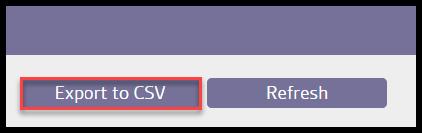
To export an Average Contract Rates Report as a CSV File, select Export to CSV.
How Does the Software Calculate the Contract Value?
There are a few different factors that affect the way the software calculates the contract value:
- The regular frequency of the service, and if a follow-up service is included or not.
- The contract value is calculated by the initial ticket price + (the regular amount of services multiplied by the recurring ticket price).
- If there is a follow-up service right after the initial service, it will usually add an extra service to the contract.
- Example: If a Quarterly agreement includes one initial service at $99 and four regular services at $120 for the first 12 months, the total contract value would be worth $579 ($99 + ($120 times 4)).
- If a Monthly agreement includes one initial service at $200 and eleven regular services at $99, the total contract value would be calculated by $200 + ($99 times 11) = $1,289.
- If the service is seasonal or not.
- To calculate the contract value for seasonal services, take the initial price plus the number of monthly payments times the recurring ticket price.
- Example: A customer on a Summer service that is seasonal between the months of May to October, with an initial price of $200 and a recurring ticket price of $99. If the initial is in May, and the customer has five regular services in the following months up to October, the contract value would be calculated by $200 + ($99 times 5) = $695.
- If a customer has an upcoming due date outside of the season end, as long as 60% of the frequency has passed, the software will squeeze in another service.
- Example: A seasonal service has a 30-day frequency and starts January 1st and ends April 1st. A customer’s initial appointment for that seasonal service begins on January 10th. This means the customer’s upcoming due dates will be projected to be on January 10th, February 10th, March 10th, and April 10th. The customer’s last appointment is due outside of the season end. However, since at least 60% of the frequency had passed between March 10th and April 1st, the software considered the last appointment of the season so the customer isn’t cut short.
- If the customer is set up on recurring billing or not.
- The formula to find the contract value for customers on a recurring billing frequency is the initial service price plus the number of monthly payments in the first year times the price of the monthly payments.
- Example: To find the contract value for a customer that has an initial price of $90 and eleven monthly recurring payments of $50 would be calculated by $90 + ($50 times 11) = $640.
- When a customer is on any recurring billing frequency, the contract value does not take the frequency of the service type into consideration, so this formula will apply whether the customer has a quarterly, bi-monthly, seasonal service, etc.
- For customers on a monthly billing frequency: The software will only consider 11 monthly payments into the contract value by default. However, to increase the contract value for commission purposes, some people may want to calculate the contract value by the initial + 12 monthly services. This is a preference that can be changed in the software. Email or call support for more information.
- If the customer is on a custom schedule or not.
- If the customer is on a custom schedule, the contract value will be calculated by the initial ticket price + (the regular amount of services multiplied by the recurring ticket price).
 Moxie Pest Control Office Guide