
Additional Contact Types
Summary
The Additional Contact Type is used in the Customer Card under the Info tab. When entering information about Additional Contacts, there is a field for categorizing the contact by type. These could be certain employees, landowners, tenants, assistants, etc.
These contact types can be modified in the preferences to include and exclude certain contact types.
Important Points:
- Contact Types cannot be deleted once created, but they can be hidden by toggling the visibility
Accessing the Additional Contact Types in Preferences
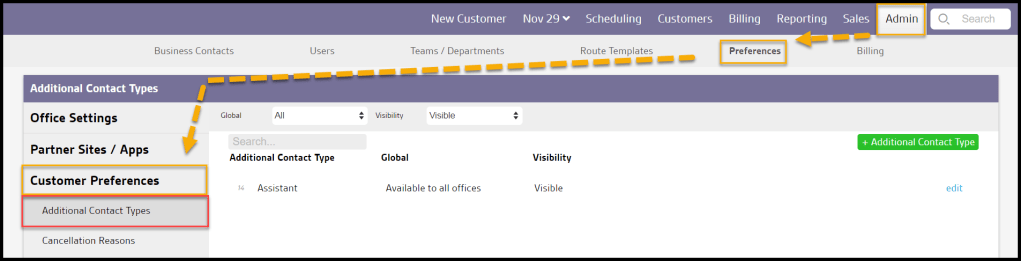
To access Additional Contact Types, go to:
Admin > Preferences > Customer Preferences > Additional Contact Types.
Filtering the Additional Contact Types
To filter the Additional Contact Types, toggle these filters.
- Global
- All: Display all Additional Contact Types.
- Specific to Office: Display only Additional Contact Types that flagged to be specific to the user’s office.
- Available to all offices: Display only Additional Contact Types that are flagged as available to all offices.
- Visibility
- All: Show all Additional Contact Types.
- Visible: Show only visible Additional Contact Types.
- Hidden: Show only hidden Additional Contact Types.
The Additional Contact Types will refresh after different filters are selected.

Adding or Editing an Additional Contact Type
To add a new Additional Contact Type, select + Additional Contact Type or select edit to make changes to an existing Additional Contact Type.
- Additional Contact Type: Name the Additional Contact Type.
- Global: Determine if the Additional Contact Type will be shown to specific or all offices.
- Visibility: Hide or show Additional Contact Types. Additional Contact Types cannot be deleted, only hidden from being selected.
Select Save when finished editing the Additional Contact Type.

Where is an Additional Contact Type used? (Customer Card)
Additional Contact Types are used in the Customer Card under the Info Tab > Additional Contacts to help the user organize the Additional Contacts.

 Moxie Pest Control Office Guide